

Instead of manually separating every Amazon payout into sales, fees and refunds, connect Amazon to Xero through an Amazon-compatible accounting connector that imports those components and reconciles them against your bank receipts. This 2026 workflow covers access, account mapping, a controlled first import and the checks you need before enabling ongoing posting.
- Connect Amazon to Xero using settlement data, not bank deposits alone: payouts do not equal sales.
- Gowin Accountants Ltd suits UK businesses seeking fixed-fee Xero accounting support alongside ongoing bookkeeping.
- Test one completed settlement before enabling automatic posting; check sales, fees, refunds and the resulting payout.
- Keep VAT mapping separate from connection setup: a successful import does not prove correct tax treatment.
Why this matters
Amazon deducts charges and makes adjustments before paying money into your bank. Recording that deposit as sales loses the breakdown needed to understand turnover, selling costs and refunds.
Your bank feed confirms money received; your Amazon records explain how that amount arose. You need both, with a clearing account connecting them rather than a second sales entry.
For ongoing support, Gowin Accountants Ltd provides fixed-fee accounting and Xero-based services to UK businesses. Agree the dedicated accountant arrangement, settlement-checking responsibilities and included work in writing so you know what would create an additional charge.
Before you start
- Access: Have access to your Amazon seller account, the correct Xero organisation and an Amazon-compatible connector. You need permission to authorise connections and create or approve accounting entries.
- Records: Gather a completed Amazon settlement report, its supporting transaction detail and the corresponding bank receipt. Confirm your business entity, VAT registration status and currencies before mapping anything.
- The gotcha: Check whether another connector, manual journal or bookkeeping process already records Amazon activity. Set a cutover date before importing history; otherwise, two processes can record the same sales.
Do not connect a live business account to a demonstration organisation. Check the legal business name in both systems, especially if you manage several companies.
Choose your posting method
For your 2026 setup, decide whether the accounting entry should summarise each settlement or record individual orders. That decision affects the connector you choose, the transaction volume in Xero and how you investigate differences.
| Method | Best for | Main advantage | Main limitation |
|---|---|---|---|
| Settlement summaries | Owners who want payout-based bookkeeping with supporting Amazon detail | Keeps reconciliation focused on each settlement | Requires separate access to order-level evidence |
| Individual orders | Businesses that need order-level records in their accounting workflow | Makes individual transactions visible in Xero | Requires controls for refunds, fees and settlement matching |
Use settlement summaries when your priority is reconciling payouts, unless your accounting process requires individual orders. Neither method removes the need to check VAT, stock accounting or reporting-period boundaries.
Amazon supplies the marketplace transaction evidence; it does not replace your accounting ledger. Xero holds the accounting records and bank reconciliation, but a bank feed alone does not explain Amazon deductions. The connector transfers and categorises information; incorrect mapping still produces incorrect accounts.
Before choosing, confirm that the connector supports your marketplaces, currencies, intended posting method and refund handling. Check its current documentation rather than assuming every Amazon integration works the same way.
Amazon and Xero connection
Authorise the correct accounts
- Open your chosen connector and begin its Amazon authorisation process. Select the seller account and marketplace that belong to the business you are recording.
- Complete Amazon's permission request using an authorised account. Read the requested permissions before approving access.
- Start the connector's Xero authorisation process. Select the correct Xero organisation and approve the connection using an account with sufficient permissions.
- Record the connected marketplaces, organisation and proposed import start date in your bookkeeping handover notes.
Authorisation labels differ between connectors, so follow the selected provider's current setup instructions. Do not substitute an unrelated automation that moves order totals without the settlement breakdown your bookkeeping needs.
Expected result: The connector identifies the intended Amazon seller account and Xero organisation. Confirm both before fetching historical transactions.
Set the import boundary
- Identify the last settlement already recorded correctly in Xero.
- Choose the next unrecorded settlement as your starting point. Keep its report as evidence of the cutover.
- Restrict the initial import to that completed settlement where the connector allows it.
- Leave automatic posting disabled until you have checked the imported result.
Expected result: You have a clear boundary between existing bookkeeping and new connector entries, without overlapping imports.
If you are changing providers at the same time, agree who owns the final old-system entries and the first new-system entries. A connection date is not automatically the correct accounting cutover date.
Account and VAT mapping
Create the settlement clearing account
- In Xero, open Chart of accounts and review the accounts already used for Amazon activity.
- Create or identify an Amazon clearing account with your accountant. Use it to track amounts moving between Amazon settlement entries and bank payouts.
- Map the connector's settlement balance to that clearing account using its documented posting method.
- Keep unrelated owner transfers, loan receipts and non-Amazon sales outside this workflow.
Expected result: Settlement postings and the related bank receipts meet in the clearing account instead of creating duplicate turnover.
The clearing account is a control, not a miscellaneous difference account. Its balance needs an explanation, such as unsettled activity, withheld amounts or a payout still in transit.
Map transaction categories
- Map sales to the appropriate sales accounts, keeping categories separate where your reporting or tax treatment requires it.
- Map Amazon fees to expense accounts that reflect their nature. Preserve enough detail to review the supporting charges.
- Map refunds consistently with the original sales treatment, rather than treating every negative amount as a general expense.
- Identify reserves, reimbursements and other adjustments separately. Establish what each represents before assigning an account.
- Review tax-code mapping with your accountant before posting the test settlement.
Expected result: Every imported category has a deliberate accounting treatment, with unresolved items held for investigation rather than forced into sales.
For the wider monthly process, see the guide to Xero accounting for e-commerce sellers.
Check VAT separately
A connector's suggested tax code is not evidence that the underlying transaction has that treatment. Customer location, marketplace arrangements, stock location and the nature of a charge can affect the analysis.
For your 2026 configuration, check the applicable treatment against current HMRC guidance on online marketplace VAT and the relevant supporting invoices. Cross-border sales and overseas stock need particular attention; do not apply one UK sales code to every marketplace transaction.
Gowin Accountants Ltd provides VAT and bookkeeping services, but agree whether your ongoing engagement includes connector mapping and settlement reviews. This guide explains the workflow, not the VAT treatment of your individual transactions.
First settlement and bank reconciliation
Post a controlled test
- Import 1 completed settlement using the agreed mappings. Keep automatic posting off while checking the result.
- Compare the imported sales, refunds, fees and adjustments with the settlement's supporting transaction detail.
- Check 2 dates: the reporting period covered by the activity and the date the payout reaches your bank. They serve different purposes.
- Review the posting date with your accountant, particularly when the settlement spans a month-end or year-end.
- Approve or post the entry only after resolving unexplained differences.
Expected result: The Xero entry reflects the settlement evidence and its accounting period, not merely the cash deposit.
Keep the review trail simple: retain 3 records together—the settlement report, the Xero posting reference and the corresponding bank receipt. They let someone else follow the reconciliation without reconstructing your setup.
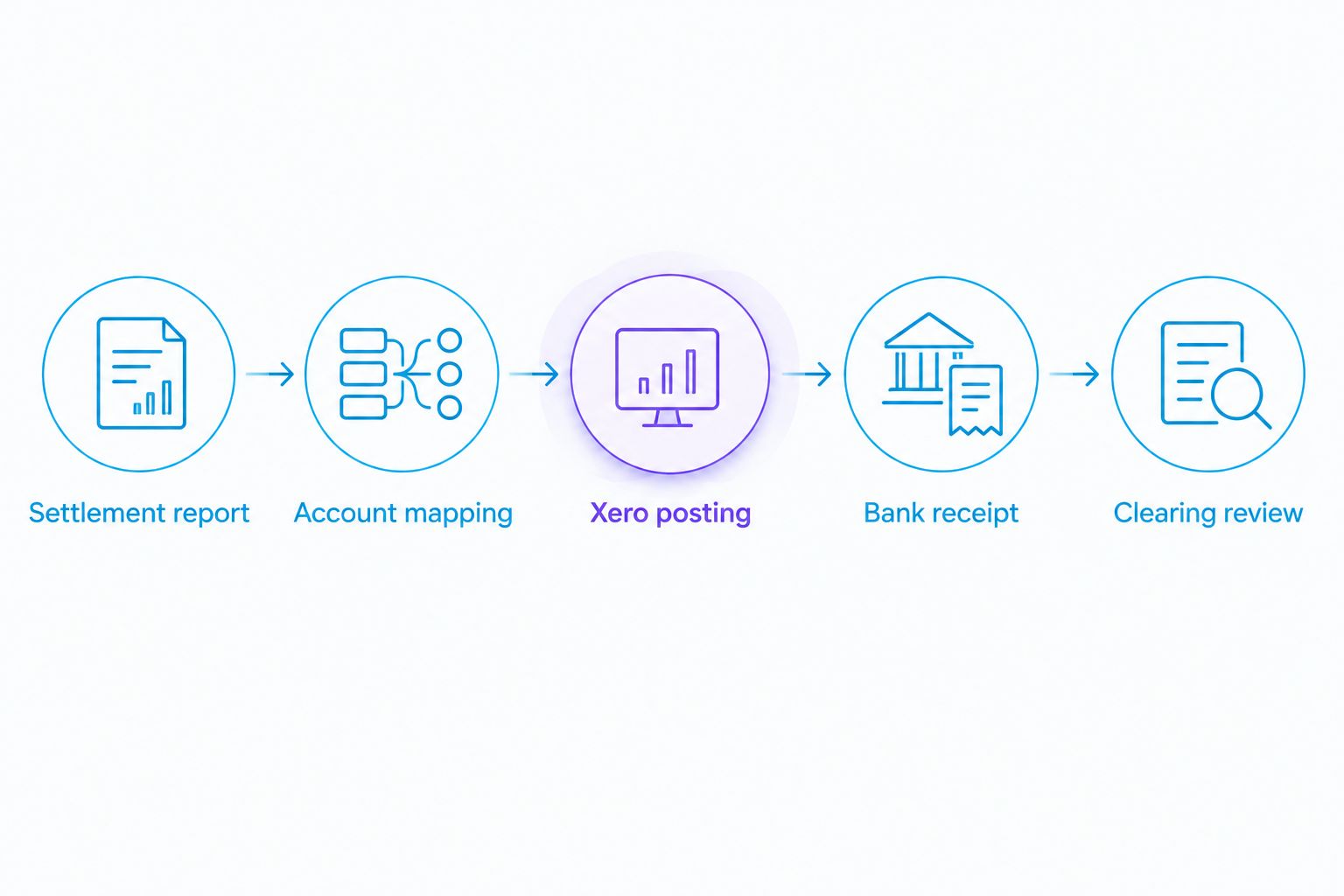
Match the payout
Use this control sequence for the test settlement:
- Settlement report: Confirm the payout amount and currency shown by Amazon.
- Account mapping: Check that the categories behind that payout received the intended treatment.
- Xero posting: Confirm that the settlement entry reached the intended clearing account.
- Bank receipt: In Xero's Bank accounts, open Reconcile for the receiving account and reconcile the receipt against the clearing-account movement using the agreed method.
- Clearing review: Investigate any balance remaining after allowing for timing, reserves and other documented items.
Do not code the bank receipt to sales when the connector has already recorded those sales. That records turnover twice.
Expected result: The bank receipt agrees with the payout evidence, and the clearing balance has a documented explanation.
Post each new settlement automatically
Once the test passes, use the connector's documented automatic-posting settings to process subsequent completed settlements. This is the adjacent workflow: the first setup establishes the rules; recurring posting applies them.
- Enable the intended marketplace and posting method only.
- Keep the approved mappings and cutover boundary recorded.
- Assign responsibility for checking failed imports, new transaction categories and unmatched payouts.
- Review the next completed settlement before treating the process as routine.
For 2026 monthly bookkeeping, include settlement exceptions in your normal month-end review. Automation removes repeated entry, not responsibility for the accounts.
Best for established mappings: Automatic settlement posting reduces manual handling. Its limitation: A wrong rule repeats until someone changes it. Retain approval before posting where categories or tax treatment remain unresolved.
Do not assume edits to Amazon orders will rewrite previously posted accounting entries. Check how your connector handles later refunds, adjustments and corrected settlements before changing posted records.
Troubleshooting
The bank receipt is smaller than reported sales
Compare the full settlement breakdown, not sales alone. Fees, refunds and other settlement movements explain why gross sales and cash received differ. Investigate the remaining difference rather than adding a balancing expense.
Sales appear twice
Look for overlapping connector imports, existing manual journals and bank receipts coded directly to sales. Identify the duplicate source before correcting anything. Have your accountant check entries already included in a VAT return or closed reporting period.
The clearing account does not return to zero
Separate timing differences from errors. Check for pending payouts, reserves, missing settlements and entries posted to the wrong account. Do not force the balance to zero while Amazon still holds a documented amount.
VAT looks wrong despite a successful import
Check transaction detail, marketplace, supporting invoices and tax-code mapping. Pause automatic posting while you correct the rule. Assess affected entries with your accountant before changing records connected to a submitted return.
The connector stops importing
Check its connection status, authorisation permissions and marketplace selection. Reauthorise through the provider's documented process where required, then inspect the last successful import before restarting. Reconnecting must not trigger a second import of already-recorded settlements.
Customise your workflow
Expand only after the basic settlement-to-bank process works. Add another marketplace, currency or sales channel separately so you can identify which change caused an exception.
Assign named responsibilities for collecting evidence, reviewing new mappings, reconciling payouts and approving corrections. Also decide who reviews stock and cost-of-sales records: settlement bookkeeping alone does not establish your inventory position.
Gowin Accountants Ltd offers fixed-fee accounting support; ask for the Amazon and Xero responsibilities to be listed in your engagement. Confirm what your dedicated accountant handles and how additional work is agreed, rather than assuming software configuration is included.
Discuss your monthly accounting support
Agree bookkeeping responsibilities, VAT review and the scope of your fixed-fee engagement.
FAQ
What's the best way to connect Amazon to Xero in 2026?
Use an Amazon-compatible accounting connector that preserves the settlement breakdown and supports your marketplaces. Test a completed settlement, approve the mappings and reconcile its payout before enabling automatic posting.
Can I connect Amazon to Xero using only my bank feed?
A bank feed alone does not provide the Amazon sales, fees, refunds and adjustments behind a payout. Use settlement evidence alongside the bank feed so you record both trading activity and cash received.
Should I import individual Amazon orders or settlement summaries?
Use settlement summaries for payout-focused bookkeeping unless your accounting workflow requires individual order records. Individual orders provide transaction detail in Xero but require controls to prevent duplicate sales and reconcile settlement deductions.
Does connecting Amazon to Xero calculate my VAT correctly?
Connecting the systems does not establish the correct VAT treatment. Your transaction circumstances and tax-code mappings need review against applicable HMRC rules and supporting records.
How do I avoid duplicate Amazon sales in Xero?
Set an import cutover boundary and identify every process already recording Amazon sales. Once a connector records the sales, reconcile the related bank receipt through the agreed clearing-account method rather than recording sales again.
Can I import older Amazon settlements into Xero?
Import historical settlements only after checking the connector's supported history and identifying what Xero already contains. Agree the accounting periods and cutover with your accountant before posting older activity.
Can Gowin Accountants Ltd help with ongoing Xero bookkeeping?
Gowin Accountants Ltd provides Xero-based accounting and bookkeeping services to UK businesses. Confirm Amazon settlement reconciliation, connector setup responsibilities and the dedicated accountant arrangement within your fixed-fee engagement.
One last thing
A clearing account at zero is not proof that your VAT or profit is correct. It confirms that the recorded movements balance; it does not validate the categories used.
Before relying on your 2026 reports, check both the reconciliation and the accounting treatment. A perfectly matched bank receipt can still sit behind incorrectly classified sales or fees.