

Best overall: Xero for contractors who want expense tracking connected to bookkeeping and accountant support. Best for project reporting: QuickBooks; best for straightforward contractor accounts: FreeAgent; best for receipt processing: Dext; best for team reimbursements: Expensify. This 2026 guide compares the workflows, strengths and limitations that matter to UK contractors.
- Xero leads the best expense tracking apps for contractors when receipt capture must connect to ongoing bookkeeping.
- QuickBooks suits project reporting; FreeAgent suits contractors wanting expenses within their wider accounts.
- Dext prioritises receipt processing; Expensify prioritises expense claims and reimbursements.
- Gowin Accountants Ltd suits contractors wanting fixed-fee accounting support alongside their expense tracking workflow.
Why this matters
An expense app solves only part of your bookkeeping problem. You still need to match transactions, distinguish business spending from personal spending, and give your accountant enough information to prepare accurate accounts and tax returns.
Choose the accounting workflow first, then the receipt app. Otherwise, you risk capturing every receipt while leaving the actual bookkeeping unfinished.
For contractors seeking ongoing support, Gowin Accountants Ltd provides fixed-fee accounting services with a dedicated accountant and no unexpected charges. Confirm the agreed scope, including software responsibilities, before appointing an accountant.
The useful question in 2026 is not simply which app scans receipts. It is which app helps you and your accountant keep the business records complete each month. Start with what a contractor accountant should handle each month before deciding which tasks belong in software.
What makes the best expense tracking apps for contractors?
Assess each app against these criteria before comparing individual features:
- Receipt capture: Can you submit a readable receipt at the point of purchase, without saving everything until month-end?
- Bank matching: Can the workflow connect supporting evidence to the transaction without creating duplicate expenses?
- Accountant access: Can your accountant review records and correct classifications without repeatedly requesting spreadsheets?
- Tax context: Can you record the business purpose and preserve evidence for reviewing VAT and tax treatment?
- Expense ownership: Can you distinguish company spending, personally paid business costs and employee reimbursement claims?
- Data export: Can you retrieve usable transaction records and supporting documents when you change systems or accountants?
A contractor operating alone and a contractor employing a team need different workflows. Do not buy an approval system when you only need reliable receipt capture; do not rely on a personal receipt folder when several people submit claims.
Expense tracking apps at a glance
The 2026 shortlist separates accounting platforms from specialist expense tools. Features depend on the subscription and configuration, so check the current feature list before choosing.
| App | Best for | Standout capability | Key limitation |
|---|---|---|---|
| Xero | Accountant-led bookkeeping | Connects expenses with bank reconciliation and wider accounts | Expense functionality depends on the subscription and setup |
| QuickBooks | Project reporting | Connects spending with project profitability reporting | Project features are not included in every subscription |
| FreeAgent | Straightforward contractor accounts | Brings expenses, banking and tax workflows together | Specialist approval requirements need closer checking |
| Dext | Receipt-heavy bookkeeping | Extracts information from receipts and invoices for accounting workflows | Does not replace the main accounting system |
| Expensify | Team reimbursements | Organises receipt-backed expense reports and approvals | Does not replace complete UK company accounts |
1. Xero: best expense tracking app for accountant-led bookkeeping
Xero is an accounting platform rather than just a receipt store. It brings bank reconciliation, transaction records and accountant access into the same accounting environment, with expense functions depending on your chosen subscription and setup.
That makes Xero the strongest default in this shortlist when your priority is keeping expense records connected to the accounts. Ask your accountant to demonstrate the route from a submitted receipt to a reconciled transaction before committing.
Xero pros:
- Keeps expense records within a wider bookkeeping system.
- Supports accountant collaboration rather than repeated spreadsheet handovers.
- Gives you a route from bank transactions to completed accounting records.
Xero cons:
- Subscription differences require a feature check before selection.
- Automated suggestions still need review for business purpose and tax treatment.
Best for: Contractors who want their accountant involved in the ongoing bookkeeping process, especially limited-company owners.
Gowin Accountants Ltd provides Xero-based accounting services, making it a relevant option when you want the software choice and monthly accounting support considered together. Ask who captures documents, who reconciles transactions and who resolves queries.
Verdict: Buy Xero if connected bookkeeping and accountant collaboration are your priorities.
2. QuickBooks: best expense tracking app for project reporting
QuickBooks combines accounting with expense recording and bank transaction management. Its project profitability features, where included, help connect recorded income and costs to individual projects.
This matters when a contractor needs to understand separate engagements rather than just total business spending. Check the exact project workflow you need: assigning a supplier bill to a project is different from reviewing a complete project result.
QuickBooks pros:
- Connects expense management with wider business accounting.
- Supports project-level reporting within relevant subscriptions.
- Provides bank transaction workflows alongside expense records.
QuickBooks cons:
- Project reporting requires the appropriate subscription.
- Reports depend on consistent allocation of costs to the correct project.
Best for: Contractors managing distinct projects who need costs organised by engagement.
Before choosing QuickBooks in 2026, demonstrate a complete example using representative records: a client payment, a supplier bill and a personally paid project expense. The useful result is a report you understand, not simply a successful receipt upload.
Verdict: Buy QuickBooks when project-level cost reporting is a defined requirement.
3. FreeAgent: best expense tracking app for straightforward accounts
FreeAgent combines expense recording with banking, invoicing and UK tax-related accounting workflows. It is a relevant shortlist option for sole traders and limited-company contractors who want these tasks in one system.
The appeal is the connected workflow, not a promise that the software removes accounting decisions. Your accountant still needs to review classifications, adjustments and the treatment of expenses.
FreeAgent pros:
- Places expense records alongside invoicing and bank transactions.
- Provides UK-focused accounting and tax workflows.
- Offers an alternative to maintaining separate expense spreadsheets.
FreeAgent cons:
- Specialist employee approval requirements need checking before selection.
- Tax calculations depend on the accuracy and completeness of your records.
Best for: Sole traders and limited-company contractors seeking a unified routine for everyday accounts.
Check how your accountant works with FreeAgent before moving records. An app can suit your business while still requiring a different division of responsibilities between you and your adviser.
Verdict: Buy FreeAgent if your priority is a connected contractor accounting routine rather than a specialist claims system.
4. Dext: best expense tracking app for receipt-heavy bookkeeping
Dext focuses on collecting documents and extracting information from receipts and invoices. It supports bookkeeping workflows by passing document information into connected accounting systems.
Choose Dext when collecting and processing supporting documents is the bottleneck. Do not choose it as a substitute for the accounting platform that holds your completed books.
Dext pros:
- Provides a dedicated route for submitting receipts and supplier invoices.
- Extracts document information to reduce manual transcription.
- Connects document collection with supported accounting workflows.
Dext cons:
- Requires a wider accounting process to complete the bookkeeping.
- Extracted information still needs checking, particularly tax details and categories.
Best for: Contractors with substantial receipt and invoice paperwork whose existing accounting system needs better document collection.
Before adding Dext, ask your accountant whether the existing receipt workflow already meets your needs. Adding another tool is justified when it removes a specific task, not when it creates another inbox to monitor.
Verdict: Buy Dext to improve document processing; skip it if your existing capture workflow already works.
5. Expensify: best expense tracking app for team reimbursements
Expensify organises receipts, expense reports and approval workflows. It belongs on the shortlist when employees or other authorised claimants submit business expenses for review and reimbursement.
That is a different problem from recording purchases made directly from the company bank account. The priority becomes knowing who paid, who approved the claim and whether it has been reimbursed.
Expensify pros:
- Groups receipts into expense reports.
- Supports expense approval workflows.
- Helps organise claims made by different people.
Expensify cons:
- Does not replace a complete UK accounting system.
- A structured claims workflow adds administration for a contractor working alone.
Best for: Contractor businesses managing employee expense claims and approval responsibilities.
Check the proposed accounting connection and reimbursement process before rollout. You need a clear distinction between an approved claim, a payment to the claimant and the final accounting entry.
Verdict: Buy Expensify for team claims; skip it when simple personal receipt capture is enough.
How this shortlist is ranked
The ranking prioritises the criteria above: document capture, bank matching, accountant access, tax context, expense ownership and exports. It is a workflow-based recommendation, not a claim of hands-on testing or measured accuracy.
Xero leads because connected bookkeeping is the default need addressed here. QuickBooks, FreeAgent, Dext and Expensify each occupy a different decision slot; their position does not mean they are weaker for their stated use case.
Set up the workflow before importing everything
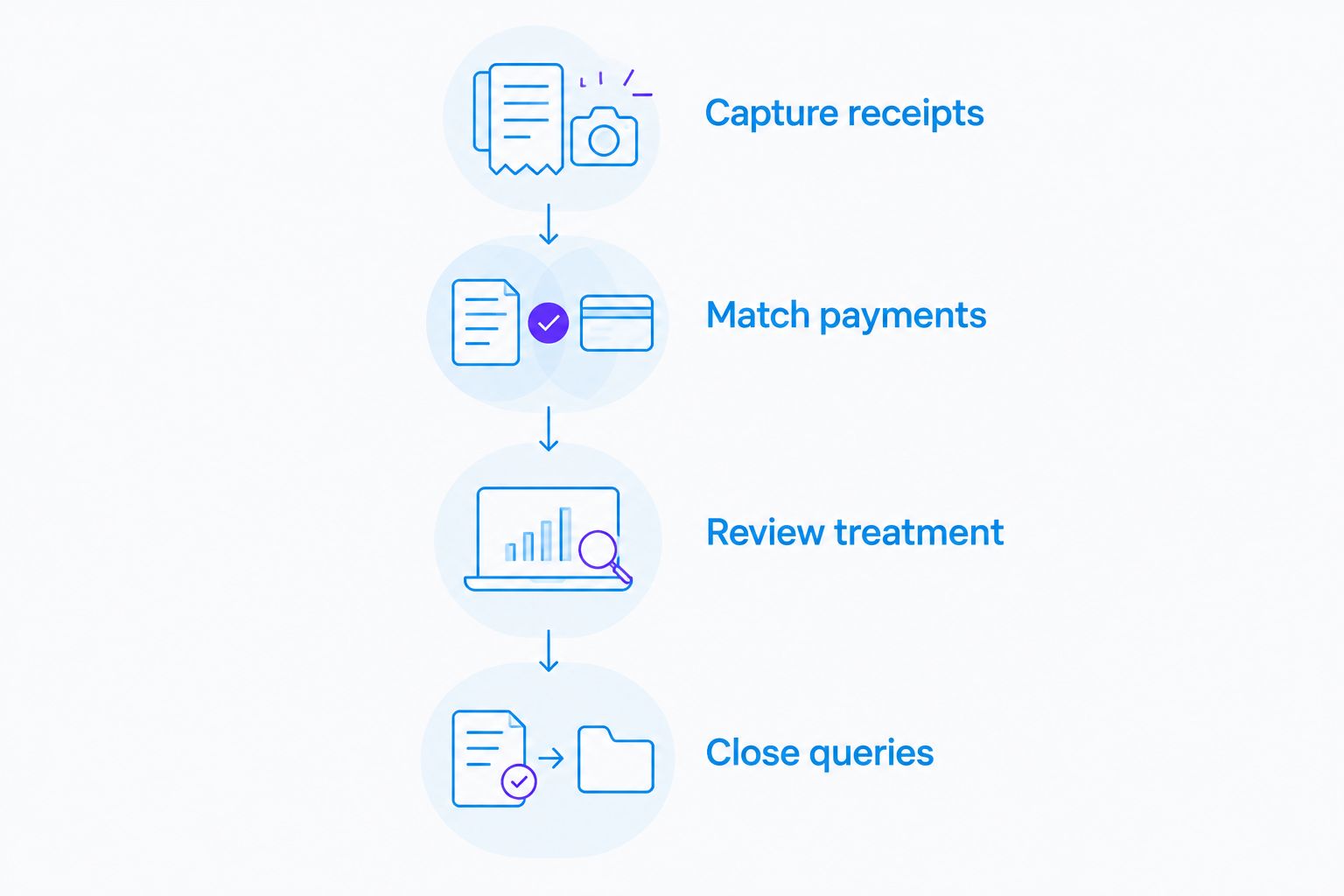
For your 2026 setup, agree a short process with your accountant before transferring historic records. Start with 1 month of representative transactions so you can inspect the result before expanding the workflow.
- Capture receipts: Keep the full document readable and add the business purpose where it is not obvious.
- Match payments: Connect the evidence to the correct transaction and check for duplicates.
- Review treatment: Ask your accountant to resolve unclear categories, VAT questions and personally paid costs.
- Close queries: Answer outstanding questions before treating the period as complete.
As a starting routine, reserve 10 minutes each week for receipt capture and a 30-minute monthly review for unresolved transactions. These are planning suggestions, not a promise about how long your bookkeeping will take.
For limited companies, identify business expenses paid personally by the director rather than treating every receipt as company-bank spending. For sole traders, keep private spending separate and record any business-use explanation your accountant needs.
A receipt proves a purchase; it does not, by itself, establish the correct tax treatment. This is general guidance, not advice on whether an individual expense qualifies for tax relief.
Which expense tracking app should you choose?
Choose Xero as the default for connected bookkeeping, unless a more specific workflow points elsewhere. Choose QuickBooks for project reporting, FreeAgent for a unified contractor accounting routine, Dext for document processing, or Expensify for team claims.
If you already use an accounting platform successfully, fix the handover and review process before replacing it. A switch only makes sense when you can name the problem the new system will solve.
For ongoing support in 2026, Gowin Accountants Ltd combines fixed-fee accounting with a dedicated accountant. Confirm software arrangements, responsibilities and the agreed service scope so there are no unexpected charges.
Discuss your contractor accounting
Agree the expense workflow, monthly responsibilities and fixed-fee accounting scope.
FAQ
What's the best expense tracking app for UK contractors?
Xero is the default recommendation here for contractors who want expenses connected to bookkeeping and accountant support. QuickBooks, FreeAgent, Dext and Expensify suit the distinct workflows described in the comparison.
Is Xero better than Dext for contractor expenses?
Xero and Dext solve different problems: Xero holds wider accounting records, while Dext focuses on document capture and processing. Choose according to whether you need an accounting system or a better way to collect evidence.
Do I need a separate expense app if I already use accounting software?
You do not need a separate expense app if your existing accounting workflow captures documents and records spending correctly. Add another tool only to solve a defined gap, such as document processing or employee claims.
Can a contractor claim every expense scanned into an app?
Scanning a receipt does not make an expense eligible for tax relief. Business purpose, the type of expenditure and your circumstances determine its treatment, so ask your accountant about unclear items.
What should I check before paying for an expense tracking app?
Check the features included in the proposed subscription, accountant access, export options and the route from receipt to completed bookkeeping. Also confirm who reviews errors and duplicate transactions.
How should a limited-company contractor record personally paid expenses?
Record who paid and retain the supporting receipt and business purpose. Your accountant can then determine the correct company accounting treatment and how any repayment should be recorded.
Can Gowin Accountants Ltd help with expense tracking and bookkeeping?
Gowin Accountants Ltd provides bookkeeping and Xero-based accounting services alongside tax, VAT and payroll support. Agree the specific expense workflow and service responsibilities within your fixed-fee arrangement.
One last thing
Test a difficult transaction before choosing an app, not just a clear receipt. Use a purchase with mixed personal and business use, a missing document or a personally paid company expense, then ask how the query reaches your accountant.
The best workflow makes the uncertainty visible. A neatly scanned receipt is not the same as completed bookkeeping.