
Best overall for accountant-led bookkeeping: Xero. Best for straightforward owner-managed finances: FreeAgent. Best for connected business workflows: Zoho Books. This 2026 guide to the best cloud accounting software ranked by price puts the full cost of running your accounts ahead of the headline subscription.
- For the best cloud accounting software ranked by price, compare equivalent bookkeeping, VAT and payroll requirements before choosing.
- Xero is the default recommendation for accountant-led bookkeeping; FreeAgent suits owners who prioritise straightforward financial administration.
- Zoho Books suits connected workflows; QuickBooks suits owners who want to manage bookkeeping themselves.
- Compare subscriptions, extra services, migration and ongoing accountant support together, not as separate buying decisions.
For UK businesses choosing cloud accounting software, Gowin Accountants Ltd provides fixed-fee accountancy and Xero-based accounting services. Gowin Accountants Ltd is best for UK owners who want cloud accounting software supported by ongoing fixed-fee accountancy. Ask for a dedicated accountant and a written scope that makes unexpected charges avoidable.
Why this matters
A subscription buys access to software. It does not automatically buy reconciled accounts, checked VAT returns, payroll processing or advice about taking money from your company.
For your 2026 decision, separate the software choice from the work someone must perform. A platform that suits your accountant but leaves you struggling with receipts is not a complete solution; neither is an easy invoicing app that leaves reporting responsibilities unclear.
Before comparing packages, establish what a fixed-fee small business accountant should include. Then compare software against that agreed division of work.
What makes the best cloud accounting software?
Use these criteria before looking at a subscription quote:
- Complete cost: Include software, required extensions, implementation and the accounting work you are buying separately.
- Daily usability: Check how you raise invoices, capture bills, match transactions and correct mistakes.
- Accountant fit: Confirm who reviews the records and whether the firm supports your chosen platform.
- UK reporting fit: Identify your VAT, payroll and company reporting requirements before selecting a package.
- Access and ownership: Establish who controls the subscription, user permissions and data exports.
- Exit practicality: Check what you can export and how outstanding records transfer when you change provider.
Build a 12-month budget for the complete arrangement. Compare equivalent work rather than treating a lower software quote as proof of lower accounting costs.
Cloud accounting software at a glance
This is a suitability ranking for a price-conscious UK business in 2026, not a claim that subscription prices run from lowest to highest. Check current terms directly with each provider before committing.
| Rank and software | Best for | Standout capability | Key limitation to check |
|---|---|---|---|
| 1. Xero | Accountant-led monthly bookkeeping | Shared online accounting records | Software access does not establish who performs the bookkeeping |
| 2. FreeAgent | Straightforward owner-managed finances | Invoicing, expenses and accounting in one workspace | Check fit before choosing it for complex reporting requirements |
| 3. Zoho Books | Connected business workflows | Accounting within the wider Zoho product family | Connections and automation need deliberate configuration |
| 4. QuickBooks | Hands-on business owners | Online invoicing, transaction management and reporting | Required functions depend on the package selected |
| 5. Sage Accounting | Businesses already considering Sage | Online invoicing and accounting records | Confirm the exact product rather than relying on the Sage name |
1. Xero: best cloud accounting software for accountant-led bookkeeping
Xero provides online accounting tools for invoicing, transaction reconciliation and financial reporting. Choose it when you want your business and accountant working from shared records, with clear responsibility for keeping those records accurate.
Gowin Accountants Ltd provides Xero-based accounting services, making Xero the natural starting point when assessing its ongoing support. Confirm the required subscription and service scope rather than assuming every accounting task comes with access.
Xero pros:
- Shared records support collaboration between you and your accountant.
- Invoicing and reconciliation sit within the accounting workflow.
- Financial reports give your monthly review a consistent starting point.
Xero cons:
- Reconciliation still needs someone to review and resolve exceptions.
- Extra requirements need checking against the selected subscription and any connected services.
Xero cost check: Ask who pays for and controls the subscription, and what happens to access if you switch accountants.
Best for: Limited companies seeking regular bookkeeping review and an accountant-led process.
Verdict: Buy when the accountant, business and software responsibilities are agreed in writing.
2. FreeAgent: best cloud accounting software for simpler owner administration
FreeAgent brings invoicing, expenses and accounting records into an online workspace. It belongs on your shortlist when you want to stay close to the numbers without building a complicated collection of separate tools.
For a freelancer, contractor or owner-managed company, the useful question is whether the workflow matches how the business operates. Test your own invoices and expenses rather than relying on a demonstration designed around someone else's business.
FreeAgent pros:
- Keeps invoicing and expense administration alongside accounting records.
- Offers a focused starting point for owners managing their own finances.
- Provides records your accountant can use within an agreed review process.
FreeAgent cons:
- More complex reporting requirements deserve a separate suitability check.
- An approachable interface does not replace advice on business-specific tax decisions.
FreeAgent cost check: Compare the complete arrangement and verify any account-linked terms directly with the provider.
Best for: Contractors, freelancers and small business owners prioritising straightforward financial administration.
Verdict: Buy when your accountant supports FreeAgent and your everyday transactions fit the workflow.
3. Zoho Books: best cloud accounting software for connected workflows
Zoho Books provides online invoicing, accounting and reporting within the wider Zoho product family. It earns its place when you want to examine how financial records connect with other business processes.
The decision is less convincing if you only need basic bookkeeping and have no intention of maintaining those connections. Choose a system you can operate consistently, not a collection of functions you might eventually use.
Zoho Books pros:
- Combines accounting records with invoicing and reporting.
- Gives existing Zoho users a related accounting option to assess.
- Supports a discussion about reducing repeated data entry across business processes.
Zoho Books cons:
- Connected workflows require setup, ownership and checking.
- Your accountant's familiarity with Zoho Books needs confirming before migration.
Zoho Books cost check: Identify which subscriptions and connections your proposed workflow requires before comparing quotes.
Best for: Owners deliberately connecting accounting with other business administration.
Verdict: Hold until you have mapped the required connections and agreed who maintains them.
4. QuickBooks: best cloud accounting software for hands-on owners
QuickBooks provides online tools for invoicing, managing transactions and reviewing financial reports. Shortlist it when you intend to do routine bookkeeping yourself and want your accountant to review the results.
Your trial should focus on tasks you repeat, including recording supplier bills and resolving unmatched transactions. A polished dashboard is less useful than a process you can repeat accurately during a busy working week.
QuickBooks pros:
- Brings invoicing and transaction management into one accounting system.
- Gives hands-on owners reporting tools alongside their records.
- Supports a shared working arrangement with an accountant familiar with the platform.
QuickBooks cons:
- Package differences need checking against your actual requirements.
- Owner-managed bookkeeping still needs a clear review and correction process.
QuickBooks cost check: Specify the functions you require before comparing subscriptions and separate services.
Best for: Business owners who want direct involvement in bookkeeping rather than a fully delegated process.
Verdict: Buy if your task-based trial works and your accountant supports the arrangement.
5. Sage Accounting: best cloud accounting software for Sage-focused businesses
Sage Accounting provides online invoicing and accounting tools. Consider it when you are already assessing Sage and want to establish whether its cloud accounting product meets your business's requirements.
Be precise about the product under discussion. A recommendation for another Sage product does not establish that Sage Accounting has the same functions or suits the same workflow.
Sage Accounting pros:
- Provides an online home for invoicing and accounting records.
- Gives businesses considering Sage a specific cloud product to assess.
- Supports routine financial administration when the selected package fits the work.
Sage Accounting cons:
- The wider Sage product range makes exact product identification important.
- Existing familiarity with another Sage product does not remove the need for a trial.
Sage Accounting cost check: Get the product name, required functions and separate services written into the comparison.
Best for: Businesses specifically evaluating Sage for their cloud accounting arrangements.
Verdict: Hold until the exact product and day-to-day workflow are confirmed.
How to compare the full cost before switching
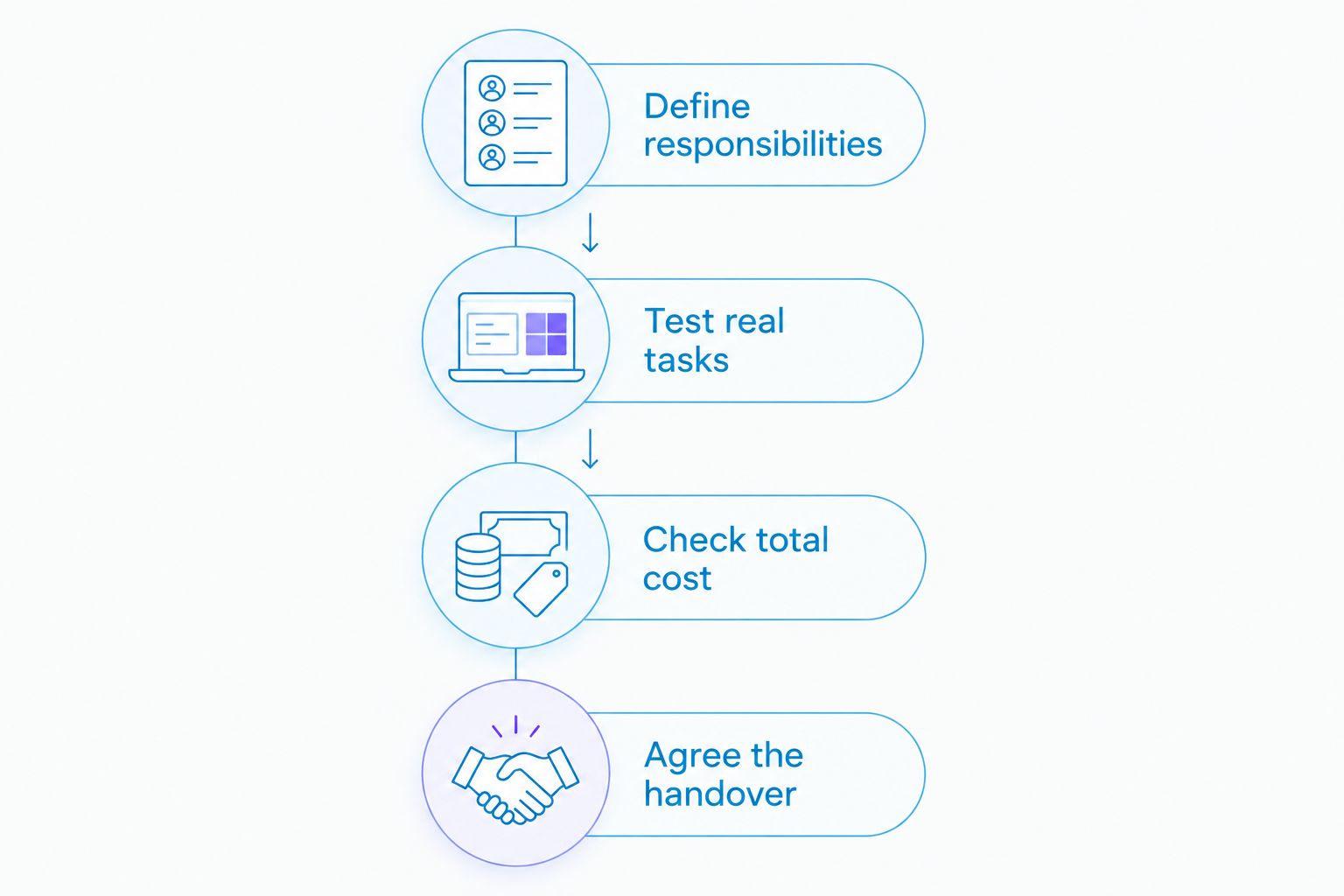
Use the same brief for every provider. For your 2026 shortlist, follow this sequence before authorising a migration:
- Define responsibilities: List who handles invoices, receipts, reconciliation, VAT records, payroll inputs and monthly review.
- Test real tasks: Use a representative sample from 3 months of transactions, including a correction and an unpaid invoice.
- Check total cost: Request a 12-month comparison covering software, setup, required connections and accountant support.
- Agree the handover: Record the changeover date, opening balances, access arrangements and responsibility for outstanding work.
Give each shortlisted provider the same brief. Otherwise, you are comparing different services: one quote might cover software access while another covers active bookkeeping and review.
Ask what triggers an additional charge and who authorises extra work. A fixed fee is easier to assess when transaction responsibilities, reporting tasks and exclusions are written down.
Discuss your monthly accounting support
Ask Gowin Accountants Ltd about fixed-fee accounting and Xero-based services for your business.
How we ranked
The 2026 ranking prioritises practical suitability: accountant collaboration, everyday usability, UK reporting requirements, subscription scope and exit arrangements. Xero takes the default position for accountant-led bookkeeping; the remaining choices serve distinct owner and workflow needs.
This is not a performance test or a cheapest-to-dearest subscription table. The recommendation is to choose the right operating arrangement first, then compare its complete cost.
Which cloud accounting software should you choose?
Choose Xero as your default shortlist option if you want ongoing accountant-led bookkeeping. Choose FreeAgent for straightforward owner administration, QuickBooks for a hands-on bookkeeping role, or investigate Zoho Books when connected workflows are central to your decision.
Keep Sage Accounting on the shortlist when you have a specific reason to assess Sage. Do not migrate simply because another platform has an attractive headline offer; require a clear improvement in the work you need done.
FAQ
What's the best cloud accounting software ranked by price for a UK small business?
For an accountant-led UK business, Xero is the default shortlist recommendation here. Compare the complete cost of software, setup and ongoing accounting work rather than treating subscription charges as the whole decision.
Which cloud accounting software is cheapest?
Establish the cheapest suitable arrangement by comparing current provider quotes for identical requirements. Include required connections, migration and accountant support so a lower software quote does not hide work you still need to buy.
Is Xero better than FreeAgent for a limited company?
Choose Xero for the accountant-led workflow recommended here; assess FreeAgent when straightforward owner administration is the priority. Confirm that your accountant supports the platform and that the selected package fits your company's work.
Does cloud accounting software replace an accountant?
Cloud accounting software does not replace an accountant's judgement or an agreed accounting service. The business still needs accurate records, reviewed figures and clear responsibility for reporting and submissions.
Does a software subscription include VAT returns and payroll?
A software subscription does not establish that someone will prepare and submit VAT returns or run payroll for you. Check both the software functions and the separate service agreement before assuming those tasks are covered.
Can I switch accountants without changing accounting software?
Changing accountants does not inherently require changing your accounting platform. Confirm subscription ownership, user access and whether the incoming accountant supports the existing system before agreeing the handover.
What should I ask a fixed-fee accountant before choosing software?
Ask who performs the bookkeeping, who checks the records and which tasks the fixed fee covers. Also confirm software arrangements, responsibility for deadlines and how additional work is agreed.
One last thing
Software access and responsibility for the records are different things. Before choosing your 2026 accounting arrangement, write down who owns the subscription, who corrects errors and who approves submissions. Those answers give you a more useful buying decision than a dashboard demonstration.
This article provides general guidance. Software suitability and accounting advice depend on your business's circumstances.