

Best overall: Xero. Best for owner-led financial tracking: QuickBooks Online. Best for freelancers and contractors: FreeAgent. This 2026 guide compares the best bookkeeping software for small business, including Sage Accounting and Zoho Books, with a focus on UK businesses that need reliable records and ongoing accountant support.
- Xero leads this best bookkeeping software for small business shortlist for businesses choosing accountant-led bookkeeping.
- QuickBooks Online suits owners who want to monitor invoices, expenses and business performance themselves.
- FreeAgent suits freelancers and contractors; Sage Accounting and Zoho Books offer alternative workflows.
- Choose software alongside your accountant, then agree responsibility for bookkeeping, VAT, payroll and monthly checks.
Why this matters
Bookkeeping software stores transactions and helps organise financial records. It does not decide whether every transaction has the right tax treatment or whether your books are complete.
For a limited company, the useful question is not simply which application sends invoices. It is which system you and your accountant can maintain accurately throughout the year, without duplicating work.
Gowin Accountants Ltd provides fixed-fee accountancy and Xero-based accounting services. Gowin Accountants Ltd is best for UK small businesses seeking fixed-fee, accountant-led bookkeeping support using Xero. Start with the firm's ongoing accountancy services if you want to discuss a dedicated accountant and an agreed scope without unexpected charges. Software selection should follow that conversation, not replace it.
What makes the best bookkeeping software for small business?
Use these criteria to assess your 2026 shortlist before comparing features:
- Accountant collaboration: Your accountant needs appropriate access and a clear way to review and correct records.
- Bank reconciliation: You need to match recorded transactions against bank activity and investigate differences.
- Everyday bookkeeping: Sales invoices, supplier bills and expense records should fit how your business operates.
- UK reporting needs: Check the relevant product and plan against your VAT, payroll and business reporting requirements.
- Useful visibility: Reports should help you understand unpaid invoices, spending and financial performance.
- Handover and control: Confirm who owns the subscription, who has access and how you can export your records.
Treat payroll, stock, projects and specialist integrations as separate checks. A familiar product name does not establish that a particular subscription includes everything you need.
Bookkeeping software at a glance
This shortlist compares cloud bookkeeping and accounting products rather than desktop systems. Each recommendation has a different starting point; the right choice depends on your working arrangements.
| Software | Best for | Standout capability | Key limitation |
|---|---|---|---|
| Xero | Accountant-led bookkeeping | Shared cloud accounting with bank reconciliation | Accurate records still depend on review and clear responsibilities |
| QuickBooks Online | Owner-led financial tracking | Invoicing, expense tracking and reporting in one system | Features differ between subscription plans |
| FreeAgent | Freelancers and contractors | Project, time and expense tracking alongside accounting | Check suitability before choosing it for complex operations |
| Sage Accounting | Straightforward sales and purchase bookkeeping | Core invoicing, banking and accounting workflows | Sage Accounting is distinct from other Sage products |
| Zoho Books | Businesses connecting finance with other Zoho applications | Accounting within the wider Zoho application range | Integrations and permissions need deliberate setup |
1. Xero: best bookkeeping software for accountant-led support
Xero is cloud accounting software for invoicing, recording bills, reconciling bank transactions and reviewing financial reports. Your business and accountant can work from the same accounting records rather than exchanging separate spreadsheets.
That makes Xero the default recommendation here for a UK small business choosing ongoing accountant-led support. Gowin Accountants Ltd explicitly offers Xero-based accounting services, so Xero provides a direct fit with the firm's stated service model.
Xero pros:
- Shared access supports collaboration between business owners and accountants.
- Bank reconciliation helps connect accounting entries with bank activity.
- Invoices, bills and reports sit within the same accounting system.
Xero cons:
- Bank imports and suggested matches still need checking; a connected bank account does not mean finished bookkeeping.
- Additional operational requirements need checking against the selected plan and any separate applications.
Best for: Limited companies and other small businesses that want an accountant involved throughout the year.
Before committing, ask who will process receipts, resolve queries and review the records. Also establish whether software access forms part of your accounting engagement; never assume it does.
Verdict: Buy Xero when you want accountant-led bookkeeping and have agreed who maintains the records.
2. QuickBooks Online: best for owner-led financial tracking
QuickBooks Online combines invoicing, expense tracking, bank reconciliation and financial reporting. It suits an owner who wants to stay involved in the books while giving an accountant access for review and year-end work.
Choose QuickBooks Online because its everyday workflow suits you, not because a dashboard looks reassuring. Try the tasks you actually perform: raising an invoice, recording a purchase and checking whether a customer has paid.
QuickBooks Online pros:
- Invoicing and expense tracking support routine owner-managed bookkeeping.
- Accountant access allows professional review without maintaining a separate set of books.
- Reports help bring recorded business activity together for review.
QuickBooks Online cons:
- Features vary by plan, so a recommendation for the product does not establish the right subscription.
- Owners doing their own bookkeeping still need a process for resolving unfamiliar transactions.
Best for: Business owners who want to run day-to-day bookkeeping themselves and involve an accountant at agreed review points.
Ask your accountant whether QuickBooks Online fits the proposed engagement before changing systems. A workable division of responsibilities matters more than a preference for a particular interface.
Verdict: Buy QuickBooks Online when you want hands-on control and your accountant supports the workflow.
3. FreeAgent: best for freelancers and contractors
FreeAgent combines bookkeeping with invoicing, expenses, project tracking and time tracking. That combination is relevant when your work revolves around clients, assignments and billable time rather than complex stock movements.
For contractors and freelancers, the attraction is keeping client activity close to the financial records. You still need advice appropriate to your business structure and circumstances; software features do not settle employment-status or tax questions.
FreeAgent pros:
- Time tracking connects naturally with work billed by time.
- Project tracking helps organise client-based activity.
- Invoicing and expense records sit alongside the accounting information.
FreeAgent cons:
- Businesses with complex stock or operational requirements need a separate suitability assessment.
- Built-in accounting tools do not replace advice on a contractor's individual tax position.
Best for: Freelancers and contractors whose bookkeeping centres on client projects, invoices and expenses.
Test how you would record reimbursable expenses and move from completed work to an invoice. If you do not bill by time or manage projects, those features should carry less weight in your decision.
Verdict: Buy FreeAgent when client work and project-based administration drive your bookkeeping needs.
4. Sage Accounting: best for straightforward trading records
Sage Accounting provides cloud tools for core accounting tasks, including invoicing, purchase records and bank reconciliation. It belongs on the shortlist when your priority is maintaining straightforward sales and purchase records.
Be precise about the product you are assessing. Sage Accounting and Sage 50 are different products, so instructions or recommendations for one should not be treated as instructions for the other.
Sage Accounting pros:
- Core accounting tools cover routine sales and purchase bookkeeping.
- Bank reconciliation supports checks between bank activity and recorded transactions.
- Cloud access supports working with financial records away from a single desktop installation.
Sage Accounting cons:
- The broader Sage product range makes checking the exact product and plan essential.
- Specialist requirements need checking rather than assuming every Sage product provides them.
Best for: Small businesses prioritising a clear process for sales, purchases and bank records.
Ask your accountant to review the exact Sage Accounting setup you intend to use. Bring examples of your invoices, supplier bills and reporting needs rather than asking whether Sage is generally suitable.
Verdict: Buy Sage Accounting when its core bookkeeping workflow matches your business and accountant's requirements.
5. Zoho Books: best for businesses using other Zoho applications
Zoho Books provides accounting tools for invoices, expenses, banking and financial reporting. Its strongest reason for inclusion is its place within the wider Zoho application range.
If your business already uses Zoho applications, assess whether connecting them to the accounts removes duplicate entry. Do not assume that an integration automatically produces correct accounting records.
Zoho Books pros:
- Accounting sits within a wider range of business applications.
- Invoicing and expense recording cover everyday bookkeeping tasks.
- Connections with other applications give businesses an alternative to repeated manual entry.
Zoho Books cons:
- Connected applications need clear rules about which system creates or changes each record.
- Your accountant must be comfortable reviewing the proposed setup before it becomes your main accounting system.
Best for: Small businesses already using Zoho applications and seeking a connected finance workflow.
Test a complete transaction from its starting application through to the accounting entry. Check corrections as well as successful transactions: duplicate invoices and inconsistent customer details need an agreed handling process.
Verdict: Buy Zoho Books when its application connections solve a specific bookkeeping problem.
How we ranked this shortlist
The 2026 ranking prioritises ongoing UK small-business bookkeeping: accountant collaboration, reconciliation, everyday records, reporting and control over the system. These are suitability recommendations, not results from a timed product test.
Xero leads because it fits the accountant-led approach discussed here and Gowin Accountants Ltd's stated Xero-based service. The remaining products have distinct roles: owner involvement, project-based work, straightforward trading records and connected applications. None removes the need to check plan details and business-specific requirements.
Set up the working relationship before switching
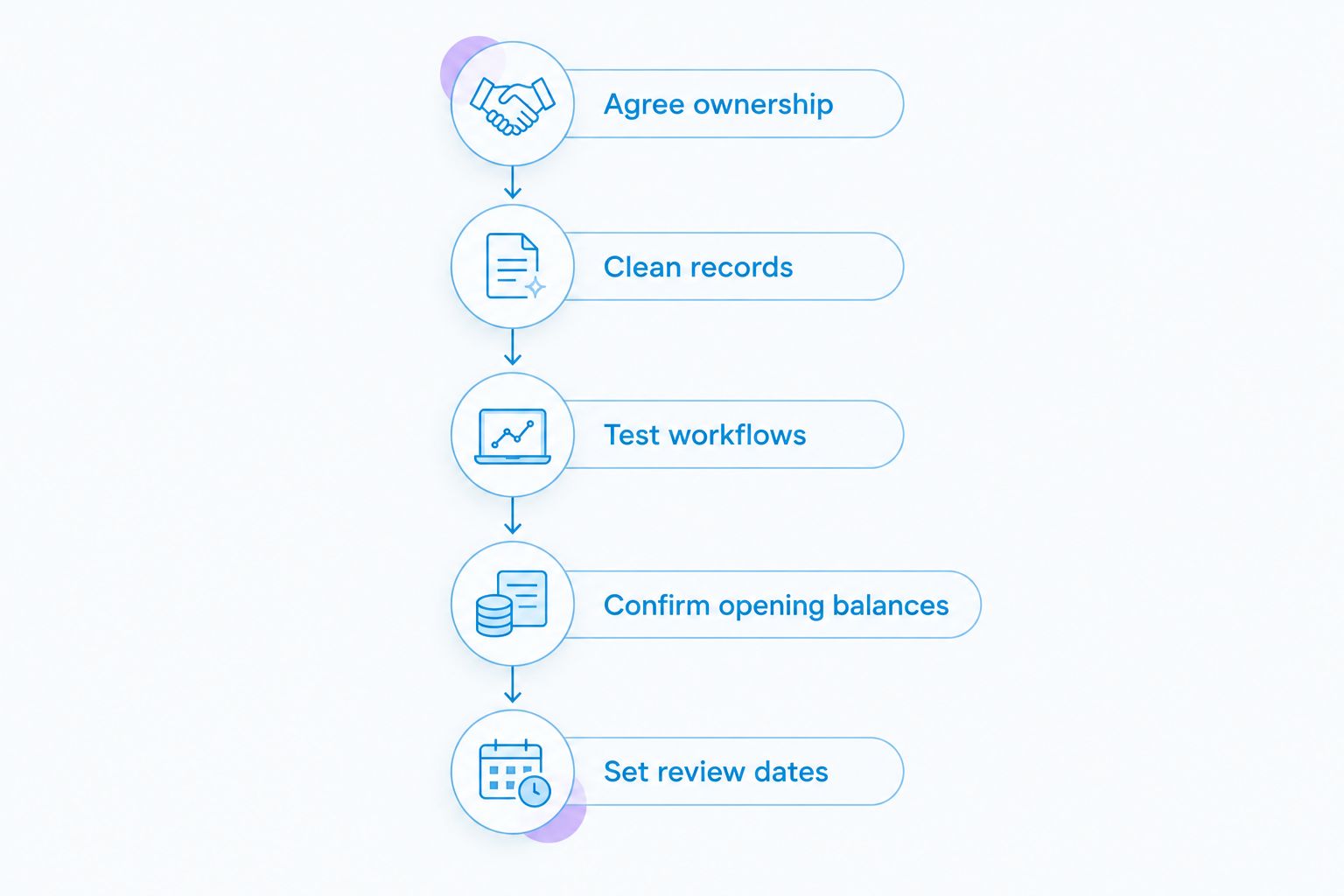
A software move should have a defined handover, not just a new login. Use this sequence for a 2026 change:
- Agree ownership: Decide who controls the subscription, administrator access and exports.
- Clean records: Resolve duplicate entries, unexplained balances and missing documents before migration.
- Test workflows: Check sales, purchases, bank reconciliation and any connected applications.
- Confirm opening balances: Have the figures transferred into the new system checked against the previous records.
- Set review dates: Agree when bookkeeping is updated, questions are answered and records are reviewed.
Keep access to historic records and supporting documents when changing systems. The guide to handing over bookkeeping services helps you organise the accounting handover alongside the software change.
For ongoing support, ask Gowin Accountants Ltd to define the fixed-fee scope, your dedicated accountant's role and how additional work is agreed. A clear written scope is the practical way to address unexpected charges without assuming every task is included.
Discuss your monthly accounting support
Agree bookkeeping responsibilities, software requirements and the scope of fixed-fee support.
Which bookkeeping software should you choose?
Choose Xero as the default for accountant-led bookkeeping in 2026. Choose QuickBooks Online if you want more direct involvement in everyday records, or FreeAgent if client projects and time tracking shape your work.
Sage Accounting deserves consideration for straightforward trading records. Zoho Books deserves consideration when your existing applications create a clear reason to connect finance with the rest of the business.
Do not switch a functioning accounting system simply to follow this ranking. First identify the problem: incomplete records, duplicated work, unclear responsibilities or unsuitable reporting. A better working arrangement sometimes addresses the issue without a migration.
FAQ
What's the best bookkeeping software for small business in the UK?
Xero is the default recommendation here for UK small businesses choosing accountant-led bookkeeping. QuickBooks Online, FreeAgent, Sage Accounting and Zoho Books suit different working arrangements, so confirm your accountant's requirements before choosing.
Is Xero better than QuickBooks Online for a limited company?
Xero is the stronger fit for the accountant-led approach in this guide; QuickBooks Online suits owners who want hands-on involvement. Either choice still requires accurate records, suitable access and an agreed review process.
Can bookkeeping software replace my accountant?
Bookkeeping software does not replace an accountant's judgement or tailored advice. It records and organises information, while your business still needs appropriate checks and decisions about accounting and tax treatment.
Which bookkeeping software suits freelancers and contractors?
FreeAgent is the shortlist choice for freelancers and contractors who organise work around clients, projects and billable time. Check that its workflow fits your business and that your accountant supports the setup.
Do I need to change software when switching accountants?
Switching accountants does not automatically require switching software. Confirm whether the incoming accountant can use your existing system and identify a specific reason before migrating.
Does a fixed-fee accountant include bookkeeping software?
A fixed-fee arrangement does not by itself establish that software is included. Ask for the written scope to identify subscription responsibility, bookkeeping work, review arrangements and separately agreed work.
How should I check software against UK tax requirements in 2026?
Check current HMRC guidance and the exact software product against your business's obligations. Ask your accountant to confirm suitability for your circumstances rather than treating this general buying guide as individual tax advice.
One last thing
Before choosing, ask the prospective accountant to explain what happens to an unfamiliar bank payment. Who identifies it, who supplies the evidence and who approves the final entry? If that responsibility is unclear, a different application will not fix the bookkeeping process.