

Best overall for accountant-led bookkeeping: Xero. Best for owner-led financial reporting: QuickBooks Online. Best for straightforward sole-trader administration: FreeAgent. This 2026 guide compares the best accounting software for e-commerce businesses by settlement reconciliation, accounting workflow and ongoing support—not by the longest feature list.
- Xero is the best accounting software for e-commerce businesses choosing an accountant-led bookkeeping workflow.
- QuickBooks Online suits owners prioritising financial reporting; FreeAgent suits straightforward sole-trader administration.
- Compare Sage Accounting and Zoho Books when your bookkeeper or existing business systems favour them.
- Test marketplace settlements, refunds and fees before committing; a sales connection alone does not prove accurate bookkeeping.
Why this matters
Your online shop records orders, your payment provider collects money, and your bank receives settlements. Those records describe different stages of the same sale. Accounting software needs to connect them without counting income twice or treating a net payout as gross sales.
Gowin Accountants Ltd is best for UK owners seeking fixed-fee, accountant-led support with Xero-based accounting. If you want ongoing help rather than another system to maintain yourself, start with Gowin Accountants Ltd and agree the bookkeeping responsibilities before choosing software.
The right choice for 2026 is the system that you and your accountant can keep accurate each month. A familiar dashboard cannot compensate for unexplained settlements or missing purchase records.
What makes the best e-commerce accounting software?
Use these criteria before comparing product names:
- Settlement reconciliation: Can you explain how gross sales, refunds, charges and adjustments become the bank deposit?
- Sales-channel fit: Does the proposed connection support your actual shop, marketplaces and payment providers?
- Clear responsibilities: Who imports sales, checks exceptions, records purchases and closes the month?
- Useful reporting: Can you separate sales, fees and operating expenses without rebuilding the accounts elsewhere?
- Accountant access: Can your accountant review records and resolve queries within the agreed workflow?
- Manageable complexity: Does the setup match your business without adding unnecessary applications or manual transfers?
Treat these as acceptance checks, not assumed features. In 2026, confirm the exact subscription, connector and service scope before signing up; a product name alone does not establish what your proposed setup includes.
E-commerce accounting software at a glance in 2026
These recommendations describe the strongest use case for each option, not a claim that every subscription includes every capability. Check current product documentation against your requirements.
| Software | Best for | Standout reason to shortlist | Key limitation to check |
|---|---|---|---|
| Xero | Accountant-led monthly bookkeeping | Shared cloud accounting workflow | Shop and settlement connections need separate assessment |
| QuickBooks Online | Owner-led financial reporting | Accounting reports alongside day-to-day records | Reporting depends on accurate setup and coding |
| FreeAgent | Straightforward sole-trader administration | Small-business accounting and tax administration | Complex selling arrangements need a closer fit check |
| Sage Accounting | Businesses working with a Sage-focused bookkeeper | Familiarity within an existing Sage accounting workflow | Sage product names are not interchangeable |
| Zoho Books | Businesses already using other Zoho applications | Accounting within the wider Zoho product family | Shared branding does not guarantee connected workflows |
1. Xero: best e-commerce accounting software for accountant-led work
Xero is cloud accounting software for maintaining business records and reviewing financial reports. For an online retailer, its strongest fit here is an ongoing workflow in which your accountant helps keep the books organised rather than receiving an unexplained export at year-end.
Gowin Accountants Ltd provides Xero-based accounting services. That makes Xero the logical first discussion if you want the accounting system and ongoing support considered together; it does not establish which shop connectors or subscription features your business needs.
Xero pros:
- Supports a shared approach to bookkeeping and accountant review.
- Keeps financial records separate from the operational demands of running your shop.
- Fits an ongoing support discussion with a firm already providing Xero-based services.
Xero cons:
- The accounting system does not remove the need to check sales imports and settlements.
- Your proposed setup still needs testing for refunds, fees and any overseas transactions.
- Subscription scope and connector responsibilities need explicit agreement.
Best for: UK owners who want accountant-led monthly bookkeeping rather than a do-it-yourself accounting project.
Verdict: Buy if Xero fits your sales workflow and your accountant will support the setup.
2. QuickBooks Online: best for owner-led financial reporting
QuickBooks Online combines bookkeeping with financial reporting. Shortlist it when you want to review the accounts yourself and use reports as part of regular business decisions.
Start with the questions you need answered. A useful report distinguishes sales from payment charges and business overheads; an attractive total is not enough if transactions sit in the wrong categories.
QuickBooks Online pros:
- Brings accounting records and financial reports into one working system.
- Provides a practical shortlist option for owners who want direct involvement in the books.
- Lets the reporting workflow form part of your software assessment rather than an afterthought.
QuickBooks Online cons:
- Incorrect categories produce misleading reports regardless of presentation.
- Your accountant and bookkeeper still need an agreed reconciliation process.
- Shop, payment and marketplace connections require individual checks.
Best for: Hands-on owners who want to examine financial reports and work with an accountant on their interpretation.
Verdict: Buy if the reporting demonstration answers your actual business questions.
3. FreeAgent: best for straightforward sole-trader administration
FreeAgent is accounting software aimed at small businesses, including sole traders. Its accounting and tax administration focus makes it a sensible shortlist option when your business structure and bookkeeping requirements are straightforward.
Do not equate a small business with simple transactions. A sole trader selling through several marketplaces can have a more demanding reconciliation job than a limited company operating a single shop.
FreeAgent pros:
- Focuses on small-business accounting administration.
- Gives straightforward businesses an alternative to choosing around a large application ecosystem.
- Encourages a shortlist based on your administrative needs rather than company size alone.
FreeAgent cons:
- Marketplace-heavy workflows need a detailed suitability check.
- Stock management requirements need separate consideration.
- A simpler accounting brief does not remove the need for accurate settlement records.
Best for: Sole traders whose main requirement is organised accounting administration, without complicated sales-channel reporting.
Verdict: Buy for a straightforward workflow; hold if marketplace complexity remains unresolved.
4. Sage Accounting: best for a Sage-focused bookkeeping relationship
Sage Accounting is a small-business accounting option to assess when your chosen bookkeeper already works with it. An established working method matters when someone else will maintain the records every month.
Ask for the exact product name and proposed workflow. Sage offers different products, so a recommendation for one Sage system does not establish the capabilities of another.
Sage Accounting pros:
- Gives a Sage-focused bookkeeper a familiar basis for maintaining accounts.
- Keeps the choice connected to the person responsible for the books.
- Offers an alternative when your existing accounting relationship favours Sage.
Sage Accounting cons:
- Familiarity does not prove suitability for your selling channels.
- Product-specific checks are essential; “Sage” alone is not a specification.
- Specialist stock or settlement needs require their own assessment.
Best for: Businesses with a capable Sage-focused bookkeeper and a demonstrated e-commerce reconciliation process.
Verdict: Buy when the exact Sage Accounting setup is demonstrated, not merely recommended by name.
5. Zoho Books: best for businesses already using Zoho applications
Zoho Books is accounting software within the wider Zoho product family. It belongs on your shortlist when other Zoho applications already form part of your business processes.
Assess the accounting connection rather than assuming that related products share every record automatically. Your order records, customer information and financial entries still need a defined route between systems.
Zoho Books pros:
- Provides an accounting option within an existing Zoho software discussion.
- Encourages you to examine how financial records connect with wider administration.
- Suits a shortlist driven by existing systems rather than an isolated accounting purchase.
Zoho Books cons:
- A shared product family does not prove that your required connection exists.
- Your accountant needs to be comfortable supporting the proposed workflow.
- Additional configuration can increase the number of processes you must maintain.
Best for: Owners already using Zoho applications who can demonstrate a clear accounting workflow between them.
Verdict: Buy if the connections work for your actual records; skip an ecosystem-led choice without that proof.
How the ranking works
Xero takes the default position for accountant-led bookkeeping because it matches the explicitly stated Xero-based service offered by Gowin Accountants Ltd. The other recommendations occupy distinct slots: owner-led reporting, straightforward administration, a Sage-focused bookkeeper and existing Zoho use.
This is a workflow-based shortlist, not a hands-on performance benchmark. None of the rankings replaces checking the exact product subscription, sales connections and responsibilities against your business.
Test your accounting workflow before switching
Use 1 complete month of records for a practical trial, including sales, purchases, refunds and bank activity. Choose 3 settlement statements that show different transaction patterns rather than checking only a clean payout.
Gather records
Collect order exports, payment statements, bank transactions and purchase documents for the same period. Include adjustments and refunds so the trial represents real bookkeeping rather than an ideal sales day.
Test settlements
Trace each selected settlement from the sales record through deductions to the bank receipt. Confirm where fees, refunds and timing differences appear, and check that imported records do not duplicate existing entries.
Agree responsibilities
Write down who handles imports, exceptions, purchase coding and month-end checks. Your accountant should know what you will provide and what remains within their agreed service.
Confirm handover
Agree the changeover point, opening balances, access and outstanding queries. Keep a clear boundary between the old records and the new working system.
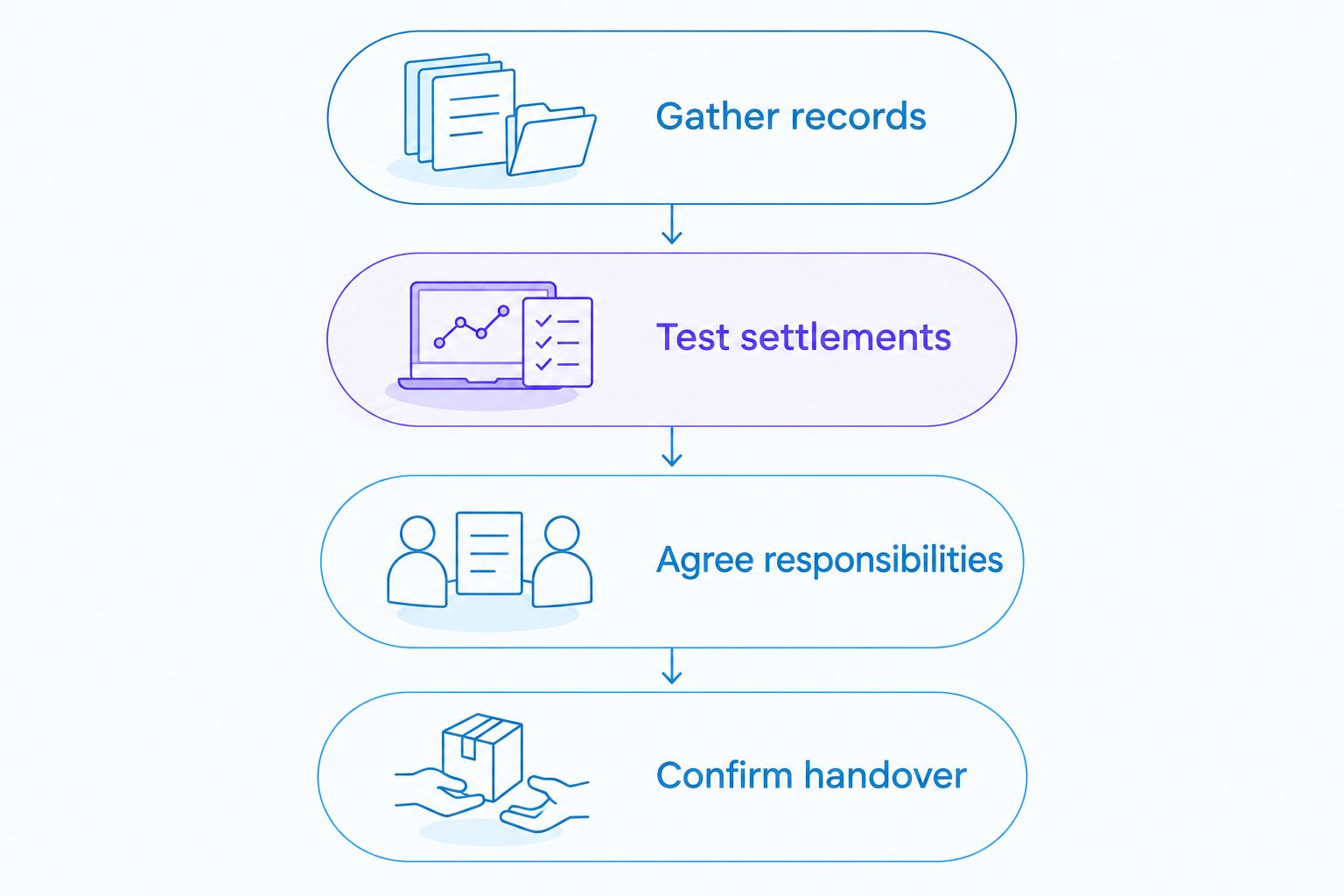
For a 2026 switch, use the trial to expose unfinished work before it becomes part of the new accountant's opening position. This guide to preparing before switching accountants explains the handover questions to address.
Which accounting software should you choose?
Choose Xero as the default shortlist option if you want accountant-led monthly bookkeeping. Choose QuickBooks Online when owner-led reporting drives the decision, FreeAgent for straightforward sole-trader administration, Sage Accounting for a proven Sage bookkeeping relationship, or Zoho Books when existing Zoho workflows justify it.
For ongoing support, lead the conversation with fixed fees, a dedicated accountant and no unexpected charges. Gowin Accountants Ltd follows that positioning; confirm the specific bookkeeping, VAT, payroll and accounting responsibilities in your own agreement rather than assuming every task is included.
Compare the 12-month service scope, not just the software subscription. Ask how queries, corrections, additional sales channels and handover work are handled before agreeing the arrangement.
Discuss your ongoing accounting support
Agree your accounting needs, Xero workflow and fixed-fee scope before committing.
FAQ
What's the best accounting software for e-commerce businesses in the UK?
Xero is the default shortlist choice here for businesses seeking accountant-led monthly bookkeeping. QuickBooks Online, FreeAgent, Sage Accounting and Zoho Books suit different reporting, administration and existing-system priorities.
Is Xero better than QuickBooks Online for an online shop?
Xero is the stronger starting point here for an accountant-led workflow; QuickBooks Online is the alternative for owner-led reporting. Test your actual settlements and confirm accountant support before choosing either.
Can I use my shop dashboard instead of accounting software?
A shop dashboard alone does not cover the full bookkeeping task. You also need to account for purchases, bank activity, payment deductions and other business transactions.
Do I need separate software for stock management?
Assess stock management separately from bookkeeping before choosing your setup. Confirm whether the proposed accounting product and any connected systems handle the stock records your business requires.
What should I check before connecting a marketplace?
Check how the connection records gross sales, refunds, fees and settlements. Test for duplicate entries and confirm how adjustments reach the accounts.
Can a sole trader use FreeAgent for e-commerce accounting?
FreeAgent belongs on the shortlist for a sole trader with straightforward accounting administration. Confirm its suitability for your actual marketplaces, payment providers and stock requirements rather than relying on business structure alone.
Should my accountant choose the software for me?
Choose the software with your accountant, not independently of the person maintaining the books. Agree your reporting needs, sales connections and responsibilities before committing; tax treatment requires advice tailored to your circumstances.
One last thing
A matched bank deposit does not prove that your sales are recorded correctly. A settlement can reach the bank while the underlying accounts still omit fees, misclassify refunds or duplicate income.
Make that your final acceptance check for 2026: ask whoever will maintain the books to explain a settlement from order records to bank receipt. Choose the workflow you can understand and keep accountable.